Uw opmerkingen


Hello
In this case, the API level that is implemented with us does not support working with this device.
We can manage this device if you request an API from the manufacturer and help us with the tests, since we do not have the necessary device.
Hello
Now we have the Onkyo AV Receiver module for the i3 lite product, could you please test its operation in i3 lite, because we are not sure that this is the same API level.
If the module works for you, we can discuss porting it to i3 Pro.
This contradicts the use of intercom modules - how can you understand that a call is ringing on the intercom?
If you need to display only the video stream, then you can use the Camera Wizard module.
Also, to use the module without SIP, you can enter dummy data and add the module to the project.
Hello.
Doorbird devices do not have a built-in SIP server, so if you add only the device itself without entering SIP server data, you can only see the video stream and open the doors.
I gave you the documentation about the project setup above.
To add light modules, you can read our wiki:
Hello
Fibaro is a script module, it means that you should configure all feedbacks via javascript.
Also fibaro is available as iridium lite module. And, as you know, you can use iridium lite modules in iridium pro panel projects
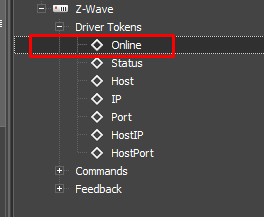
In order to know whether the equipment is on the network or not, the driver can use the Online token, using which you can find out if the equipment is on the network.
I would like to once again clarify whether you have the driver data specified correctly.
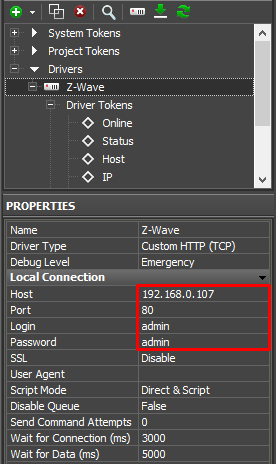
The error that you specified occurs when there is no access to the equipment, check your data and the status of the equipment through the token.
Hello
Please specify with what specifically you need help, getting a connection to Fibaro?
Hello, maybe you do not specify data for the driver and this causes an error.
If you don’t know how to set up a project using scripts, you can read our wiki
an and see our webinarshttp://www.iridiummobile.net/academy/scripts_beginners/
http://www.iridiummobile.net/academy/scripts_beginners_part_2/
Customer support service by UserEcho


The principle of work in this project is as follows: the parent object ‘satel’ is created, its task is to send the necessary commands to the device and receive answers. This object has methods for adding widgets:
satel.addBSensor (name, id, type) - binary sensor
satel.addButton (name, id, type) - button
satel.addSecurity (name, id, mode, btnNames) - protection
satel.addRelay (name, id) - switch
addTSensor (name, id) - temperature sensor
Depending on the number of widgets, the update time of each sensor may increase, because restriction on sending is added, without it the device may not have time to respond to all requests.
When adding a sensor, it adds the necessary command to the satel object to poll the device. After that, satel will regularly send this command, and record the response inside itself. The sensor checks once a second whether the data has changed. If you need to get feedback from the sensor (we’ve added feedback for binary sensors and temperature sensors for example).
Sending feedback from a binary sensor
Sending feedback with a temperature sensor.
You can track feedback changes by adding a Listener script with the EVENT_TAG_CHANGE event and a pointer to the device in the script. In our example, this Listener is added in the GUI module and simply displays the feedback name and its value.
To add widgets and save them, you can create them in a script in the GUI module. There are examples of each widget, you can uncomment them and see how it works
SATEL.irpz